Nano Banana: Google's AI Image Model Family Guide
A practical Nano Banana family guide: compare Nano Banana, Pro, 2, 2.1, and Lite, understand the names, and choose the right image workflow.
Tags
Before comparing the family, try Nano Banana 2.1.
Developer: Google DeepMind · Family: Gemini image generation · Current VioEvo route: Nano Banana 2.1 · Official references: Google DeepMind Nano Banana · Gemini API model documentation
Nano Banana is the public name people use for Google's Gemini image-generation and conversational-editing family. The name is easy to confuse because Google uses product names, API model IDs, and tier labels together. This page is the family map: it explains which name belongs to which generation, what each version is for, and where to go for the current version's exact prompts, API behavior, and pricing.
Family guide: Use this page to distinguish Google's image model names and choose a version. For current specifications, prompts, API notes, and comparisons, continue to the Nano Banana 2.1 guide.
What Is Nano Banana?
Google uses the name for Gemini image models that can create images from text and edit images through conversation. The family spans fast, mainstream image generation and a higher-capability Pro tier. The public labels do not all map one-to-one to a single API ID, so an API integration should always use the model identifier in Google's current documentation rather than guessing from the nickname.
The family is useful because its models support image creation and natural-language editing, while their speed, output resolution, reference controls, and cost differ. Google's public pages document model-specific capabilities and API contracts; the shared nickname does not imply one API endpoint or one architecture across every version.

Family sample: a period-style portrait with natural window light, embroidered fabric, and fine hair detail.
Nano Banana Naming Guide
| Name people use | What it means | Best reason to choose it | Official/API reference |
|---|---|---|---|
| Nano Banana | The nickname for Gemini 2.5 Flash Image | High-volume generation, conversational editing, and low-latency creative workflows | gemini-2.5-flash-image |
| Nano Banana Pro | The nickname for Gemini 3 Pro Image | Detail-heavy work, complex graphic design, and real-world grounding | gemini-3-pro-image |
| Nano Banana 2 | The nickname for Gemini 3.1 Flash Image | Fast, high-throughput generation and conversational editing | gemini-3.1-flash-image |
| Nano Banana 2.1 | The current high-efficiency update to Nano Banana 2 | 1K, 2K, or 4K output, multi-image fusion, search grounding, and configurable thinking | VioEvo version guide · gemini-nano-banana-2.1 |
| Nano Banana 2 Lite | The efficiency specialist in the Nano Banana 2 line | Very low latency and high-volume 1K generation | gemini-3.1-flash-lite-image |
Naming note: “Lite” is the documented name for the efficiency branch. It is distinct from 2.1, with its own API ID and positioning; check the linked documentation for current identifiers.
How the Family Evolved
Nano Banana: Conversational image generation
The original model is Gemini 2.5 Flash Image, gemini-2.5-flash-image, for high-volume generation, conversational editing, and low-latency workflows; see Google's model documentation.
Nano Banana Pro: More capable image work
Pro maps to gemini-3-pro-image and is positioned for professional-grade editing, complex graphic design, product mockups, and grounded visualizations; see Google's Gemini 3 Pro Image documentation.
Nano Banana 2: Flash-level speed
The second-generation Flash route maps to gemini-3.1-flash-image, Google's high-efficiency counterpart to Pro for fast image generation, conversational editing, and search grounding; see the official model page.
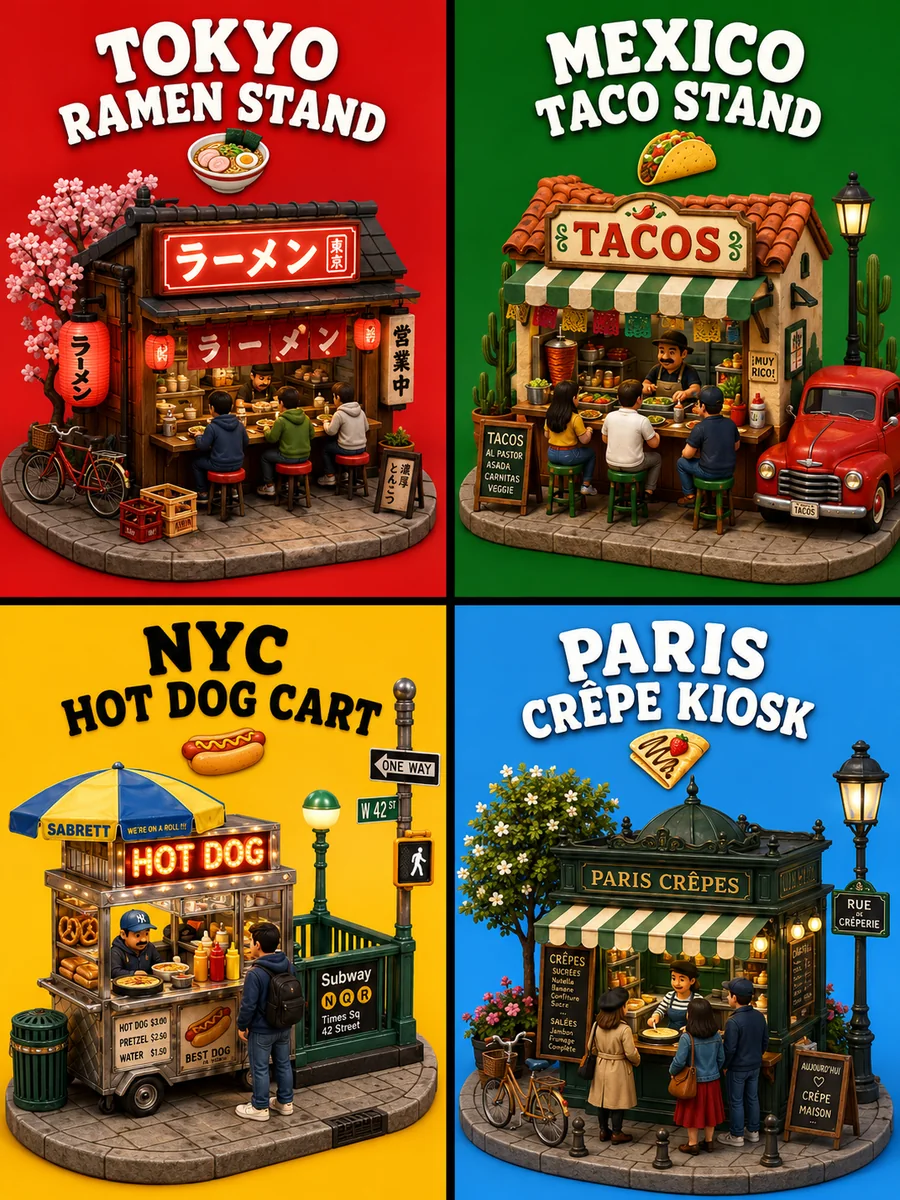
Family sample: four street-food scenes combine miniature objects, distinct signs, and a coordinated four-panel layout.
Nano Banana 2.1: The current focused guide
The 2.1 release updates the previous Flash route with stronger visual quality, text rendering, multi-turn consistency, up to 14 reference images, search grounding, and configurable thinking; see the 2.1 version guide for its exact limits and API details.
Nano Banana 2 Lite: The efficiency branch
The Lite branch is the separate gemini-3.1-flash-lite-image route, optimized for lower latency, cost-efficient high volume, and 1K output; see Google's Flash Lite image documentation.
Which Version Should You Use?
- Choose Nano Banana 2.1 for the current balanced route when you need 1K, 2K, or 4K images, stronger multi-turn consistency, accurate in-image text, reference-image fusion, or search-grounded generation. Start with the Nano Banana 2.1 workflow.
- Choose Nano Banana Pro when your evaluation shows that the Pro tier's higher capability is worth its different cost and latency profile. Confirm the current API limits before integrating.
- Choose Nano Banana 2 when you are maintaining an existing Gemini 3.1 Flash Image integration or need its documented API identity for a migration plan.
- Choose Nano Banana 2 Lite for fast 1K iterations and high-volume jobs where the Lite tradeoff fits the acceptance bar.
- Use the family page when you need the naming map or a version-selection starting point; use a version page when you need exact parameters and current pricing.
Family-Level Comparison
| Decision factor | Nano Banana | Nano Banana Pro | Nano Banana 2 | Nano Banana 2.1 | Nano Banana 2 Lite |
|---|---|---|---|---|---|
| Primary role | Original Flash image model | Higher-capability tier | Fast mainstream image model | Current high-efficiency update | Lower-latency efficiency branch |
| Documented output focus | Image generation and editing | Pro-level image generation and editing | Fast generation and editing | 1K, 2K, and 4K generation and editing | Optimized 1K generation |
| API identity | gemini-2.5-flash-image | gemini-3-pro-image | gemini-3.1-flash-image | gemini-nano-banana-2.1 | gemini-3.1-flash-lite-image |
| Reference workflow | Depends on the active version | Confirm current Pro limits | Multi-image and image editing support | Up to 14 reference images in the current API docs | Confirm current Lite limits |
| Best selection rule | Research the family | Quality and capability first | Speed and throughput first | Balanced current production route | Latency and cost first |
Source: Google DeepMind's Nano Banana family page and Google's Gemini API model documentation. Version-specific limits can change; use the linked model page before shipping an integration.
How to Evaluate the Versions
Marketing labels do not replace a controlled test. For a real decision, hold the prompt, reference images, aspect ratio, output size, and review rubric constant. Score each version separately on photorealism, text rendering, instruction following, subject consistency, latency, and cost per accepted image. Use at least 20 prompts across product imagery, people, typography, wide scenes, and iterative edits. Report pass criteria before looking at the outputs so the comparison does not become a preference poll.
The 2.1 page provides a version-specific comparison framework for Nano Banana 2 and Pro. It does not claim a universal winner because the right result depends on the prompt and acceptance threshold.

Nano Banana 2 image-editing sample: a fashion composition with repeated portrait views. Inspect facial features and accessories across the views; this finished image is not a controlled before-and-after test.
Where to Use the Family
For direct developer access, use the Gemini API or try a supported model in Google AI Studio. Google's Gemini product availability and account limits can vary by region and plan. On VioEvo, the current family entry is the 2.1 model; its credits and signup offer follow VioEvo's own pricing and eligibility rules.
FAQ
Is Nano Banana the same as Gemini image generation?
The nickname refers to Google's Gemini image-generation and editing models. It is a family label, while API requests use a specific Gemini model ID.
What is the difference between Nano Banana 2 and Nano Banana 2.1?
The 2 route maps to Gemini 3.1 Flash Image. The 2.1 release is the newer documented update with 1K, 2K, and 4K output, improved consistency and text rendering, up to 14 reference images, search grounding, and configurable thinking. Read the 2.1 version guide for the detailed delta.
Is Nano Banana Pro better than Nano Banana 2.1?
“Better” depends on the acceptance bar, latency target, and budget. Pro is the higher-capability tier; 2.1 is the high-efficiency route with 4K output and a documented multi-image workflow. Test both on the same rubric before choosing.
Is Lite the same as Nano Banana 2.1?
No. Lite is a separate Flash Lite model optimized for lower latency and 1K output. The 2.1 release has a distinct model ID with 1K, 2K, and 4K output and a broader documented feature set.
Where can I try Nano Banana?
You can compare the family here, then use the 2.1 model on VioEvo for a current image-generation workflow. For API experiments, use Google's Gemini API documentation and Google AI Studio.
